TUI
sheppy path/to/sheppy-manifest.yaml # defaults to ./sheppy-manifest.yamlThe TUI reads the manifest once, when it opens. After editing the manifest,
quit (q) and open it again.
It always opens with no profile loaded: the header reads profile <none>.
If sheppyd isn’t running anything, nothing is selected either — pick
alternatives yourself, or load a profile with l. If it is
already running nodes, from an earlier session or sheppy up, the TUI selects
what’s running, including each node’s parameter overrides, so that system
doesn’t show as drift. Crashed nodes are selected too (they keep their Δ,
and space relaunches them); stopped nodes and nodes from other manifests are
not. The header stays profile <none> with no *, so press s if you want
to keep that selection as a profile.
The screen
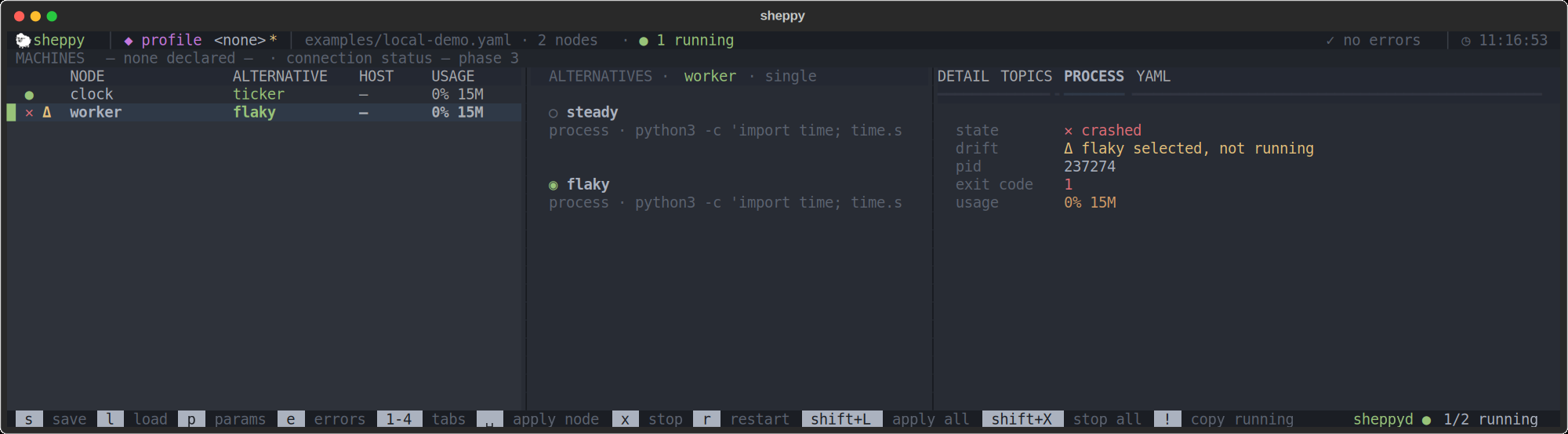
This is the Getting started demo with clock running
and worker crashed, with the PROCESS tab open.
- Header: the loaded profile (
<none>until you load or save one;*means unsaved changes), the manifest file, how many nodes are running, validation errors, and the time. - Machines strip: the machines the manifest declares. Sheppy doesn’t connect to them yet.
- Nodes (left): one row per manifest node — its state, a
Δif it has drifted, the selected alternative, its machine, and CPU and memory. - Alternatives (middle): the highlighted node’s alternatives.
◉marks the selected one; a node can also have none selected. - Detail (right): DETAIL shows the alternative’s settings, TOPICS its
declared
publishes/subscribes, PROCESS its live state and last output, and YAML the raw manifest entry. - Footer: key hints, and whether
sheppydis running.
Node states
| Glyph | State | Meaning |
|---|---|---|
○ | stopped | not running: never started, or stopped cleanly |
◐ | launching | started, and still inside the launch grace period (2 s by default) |
● | running | alive past the launch grace period |
◑ | stopping | a stop was requested; sheppy is escalating signals |
✕ | crashed | exited on its own; the exit code is on the PROCESS tab |
? | unknown | sheppyd isn’t running, so sheppy can’t tell |
Sheppy never restarts a crashed node by itself.
Drift
A Δ means what’s running differs from what’s selected (see
desired vs actual). The PROCESS tab adds a
drift line saying why:
drift line | Meaning |
|---|---|
Δ <alt> selected, not running | the selected alternative isn’t running: never launched, stopped, or crashed |
Δ running <alt>, nothing selected | sheppyd is running the node but nothing is selected for it |
Δ running <alt>, selected <other> | a different alternative is running than the one selected |
Δ params differ: <names> | the running process was launched with different values for these params |
Δ launch command changed since start | the selection now builds a different command than the one running, usually because the manifest was edited after launch |
Δ running <alt>, not in this manifest | the running alternative is no longer listed under this node |
space on the node closes the gap by launching the selection.
Keys
| Key | Action |
|---|---|
↑ / ↓ | Move through the node list, or through the alternatives once you’re in them |
Enter | On a node: move into its alternatives. On an alternative: select it, or de-select it if it’s already selected, which leaves the node with nothing to launch |
Esc | Back to the node list |
1–4 | Switch detail tab: DETAIL, TOPICS, PROCESS, YAML |
space | Apply the selection to the highlighted node: launch the selected alternative, restarting the node if it’s already running, or stop the node if nothing is selected |
x | Stop the highlighted node |
r | Restart the highlighted node with the command it was launched with. To apply a param edit, use space |
Shift+L | Apply the whole selection: shows a plan of starts, restarts, and stops, then asks to confirm. Nodes from other manifests are left alone |
Shift+X | Stop everything sheppyd is running, including nodes from other manifests (asks to confirm) |
! | Copy running: set the selection to what’s running. Press s to save it |
s | Save the selection and param overrides as a profile |
l | Load a profile (Enter loads, d deletes) |
p | Edit the highlighted node’s params — the ones its selected alternative lists in the manifest |
e | Show or hide the error overlay: manifest errors and launch warnings |
q or Ctrl+Q | Quit. Running nodes keep running |
Orphans
If sheppyd is running nodes that aren’t in the manifest you opened — started
from another manifest, say — they appear under a ─ not in this manifest ─
divider. You can stop one with x and read its logs, but space, r, and
p don’t apply, and Shift+L leaves them alone. Shift+X and sheppy down
stop them along with everything else.
Errors
A manifest with errors in some entries still opens: the errors are listed in
the overlay (e) and the rest stays browsable. If the file is missing or
isn’t valid YAML, sheppy prints the error and exits instead. The same holds for profiles: a corrupt
profile file or one that has drifted from the manifest surfaces warnings in the
overlay and the applicable remainder still loads.
Colors washed out over SSH?
Sheppy’s palette needs 24-bit color. The decision is made on the machine
running sheppy: with COLORTERM unset (SSH does not forward it by default)
and TERM=xterm-256color, Textual quantizes every color to the 256-color
palette and the background shading is lost. On the remote machine:
export COLORTERM=truecolor # add to your remote ~/.bashrc / ~/.zshrc(or forward it: SendEnv COLORTERM in your local ~/.ssh/config plus
AcceptEnv COLORTERM in the server’s sshd_config). If you use tmux on the
remote, also add set -as terminal-overrides ',*:Tc' to ~/.tmux.conf.