Sheppy
Herds the ROS2 nodes of a distributed robotics project — catalog them, switch mock vs. real, launch and supervise them from one operator console.
Why sheppy?
- Swap alternatives quickly. Each part of your system lists the
interchangeable ways to run it: a mock or the real driver, one planner or
another, different camera configs. Pick one in the TUI and press
space; sheppy stops what that part was running and starts your choice. - Profiles instead of long launch files. Launch files that switch
between configurations grow long and full of conditionals. In sheppy you
pick the configuration you want, save it as a profile (a short YAML file),
and
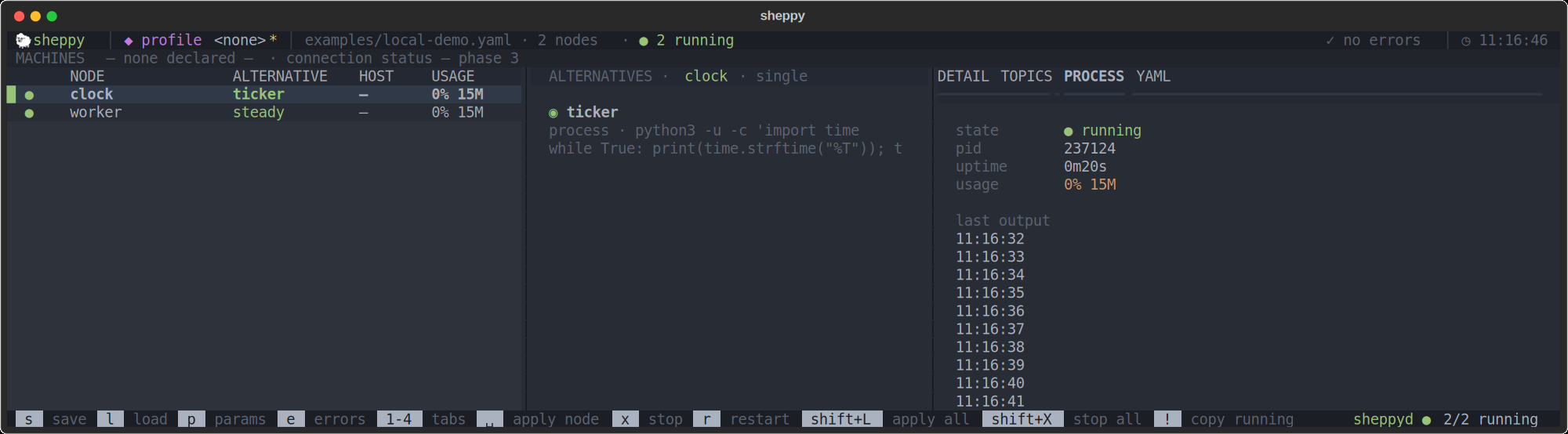
sheppy up <profile>starts that configuration again. - A terminal UI with a persistent daemon. Bring nodes up and down from a
TUI that runs in any terminal, including over SSH. A background daemon keeps
the nodes running after you close it, so you don’t need a tmux session full
of long
ros2 launchcommands. - Node status and parameters in one place. The TUI shows each node’s state, CPU and memory, and latest output, flags where what’s running differs from what you selected, and lets you change a node’s parameters and relaunch it. A crashed node is marked with its exit code and left stopped, and each run’s output is kept in its own log file.
- Containers and non-ROS programs too. Alternatives can be ROS executables and launch files, Docker containers (defined inline or taken from a compose file you already have), or any command, like a simulator GUI, all supervised the same way.
- A CLI for scripts and SSH.
sheppy up,status,logs,restart, anddownwork without the TUI.sheppy uprestarts only the nodes whose command or parameters changed.
Sheppy calls ros2 launch rather than replacing it. An alternative of kind
launch_file shells out to ros2 launch; executable shells out to
ros2 run. Sheppy is the layer above: it catalogs which launch files are
interchangeable, remembers which set you picked, and supervises the
processes so they keep running after you close the terminal.
curl -LsSf https://rammp-org.github.io/sheppy/install.sh | shFour terms come up throughout these docs; Concepts explains them:
- Node — a logical unit of your system, not a ROS node.
- Alternative — one of the interchangeable ways to run a node (mock vs. real).
- Profile — a saved selection of alternatives for the whole system.
- Daemon —
sheppyd, which launches and supervises processes.
Where to go next
What works today
Load a manifest, pick one alternative (mock vs. real) per node, save those
picks with their parameter overrides as profiles, and launch and supervise
the nodes with sheppyd. They keep running after the TUI closes.
Not yet: launching on a second machine, restarting crashed nodes automatically, starting nodes in dependency order, or checking declared topics against the live ROS graph. See the roadmap.
Sheppy is built around ROS 2, but process and docker alternatives don’t
need ROS.